<?xml version="1.0" encoding="utf-8"?><feed xmlns="http://www.w3.org/2005/Atom" ><generator uri="https://jekyllrb.com/" version="3.10.0">Jekyll</generator><link href="https://bryantp.dev/feed.xml" rel="self" type="application/atom+xml" /><link href="https://bryantp.dev/" rel="alternate" type="text/html" /><updated>2026-04-08T01:15:16+00:00</updated><id>https://bryantp.dev/feed.xml</id><title type="html">BP</title><subtitle>Hi, I&apos;m Bryant Panyarachun. </subtitle><author><name>Bryant Panyarachun</name></author><entry><title type="html">Running Ansible Navigator on MacOS without Docker Desktop</title><link href="https://bryantp.dev/blog/ansible-navigator-lima/" rel="alternate" type="text/html" title="Running Ansible Navigator on MacOS without Docker Desktop" /><published>2023-12-01T00:00:00+00:00</published><updated>2023-12-01T00:00:00+00:00</updated><id>https://bryantp.dev/blog/ansible-navigator-lima</id><content type="html" xml:base="https://bryantp.dev/blog/ansible-navigator-lima/"><![CDATA[<p>“<a href="https://ansible.readthedocs.io/projects/navigator/">Ansible Navigator</a> is a command-line tool and a text-based user interface (TUI) for creating, reviewing, running and troubleshooting Ansible content, including inventories, playbooks, collections, documentation and container images (execution environments).”</p>

<p>Currently Ansible Navigator for MacOS <a href="https://ansible.readthedocs.io/projects/navigator/installation/#requirements-macos">requires Docker Desktop</a> and doesn’t support Podman due to other technical contraints on how podman handles mounting native folders on MacOS. At the time of writing this blog there is an open issue in the ansible-navigator repo for podman support <a href="https://github.com/ansible/ansible-navigator/issues/1259">issue 1259</a>. Like me, if you’re unable to use Docker Desktop you may be looking for an alternative way to run Docker containers on MacOS, and with a general search you’ll find approaches such as using Lima or Vagrant. <a href="https://github.com/lima-vm/lima">Lima</a>, which stands for Linux on Mac, is a lightweight solution for running Linux VMs on MacOS, specifically with containerized applications, although it can also be used for non-container applications too.</p>

<h2 id="installing-lima">Installing Lima</h2>
<p>I used this <a href="https://blog.carlosnunez.me/post/docker-desktop-alternative-for-mac/">blog post</a> by <a href="https://www.linkedin.com/in/carlosinhtx/">Carlos Nunez</a> as a guide for installing Lima on my laptop.</p>

<p>I’ll include a summary of the commands that I ran, but I’d recommend following Carlos’s blog for a detailed tutorial</p>

<div class="language-plaintext highlighter-rouge"><div class="highlight"><pre class="highlight"><code>╰─ brew install lima docker


╰─ limactl --version
  limactl version 0.19.0

╰─ mkdir ~/lima_machines

╰─ curl -sSLo ~/lima_machines/docker.yaml \
  https://raw.githubusercontent.com/carlosonunez/bash-dotfiles/main/lima_machine.yaml
</code></pre></div></div>

<p>Edit the dockerfile as stated by the instructions in the file. 
Specifically:</p>

<div class="language-plaintext highlighter-rouge"><div class="highlight"><pre class="highlight"><code>  # NOTE: Replace %TEMPDIR% with your actual temporary directory as provided by
  # the $TMPDIR environment variable.
  - location: "%TEMPDIR%"
    writable: true
</code></pre></div></div>

<p>to which mine resolved to</p>

<div class="language-plaintext highlighter-rouge"><div class="highlight"><pre class="highlight"><code>╰─ echo $TMPDIR
  /var/folders/9p/5rymmxbs59d1svryg_7knth80000gn/T/
</code></pre></div></div>

<p>We’re going to come back to the section in the file later as, we’ll need to update the mounts to include a new directory when we start using Ansible Navigator.</p>

<p>Next start the Docker VM:</p>
<div class="language-plaintext highlighter-rouge"><div class="highlight"><pre class="highlight"><code>╰─ limactl start ~/lima_machines/docker.yaml --tty=false
</code></pre></div></div>

<p>Perform a final export as mentioned in Carlos’s blog and then we’re good to go.</p>
<div class="language-plaintext highlighter-rouge"><div class="highlight"><pre class="highlight"><code>╰─ export DOCKER_HOST="unix://$HOME/.lima/docker.sock"

╰─ docker ps
  CONTAINER ID   IMAGE     COMMAND   CREATED   STATUS    PORTS     NAMES

</code></pre></div></div>
<p>Note, we’ll need to add this export to ~/.zprofile, which was not mentioned Carlos’s blog.</p>

<p>At this point we are now successfully running Docker on MacOS without Docker Desktop.</p>

<h2 id="installing-ansible-navigator">Installing Ansible Navigator</h2>
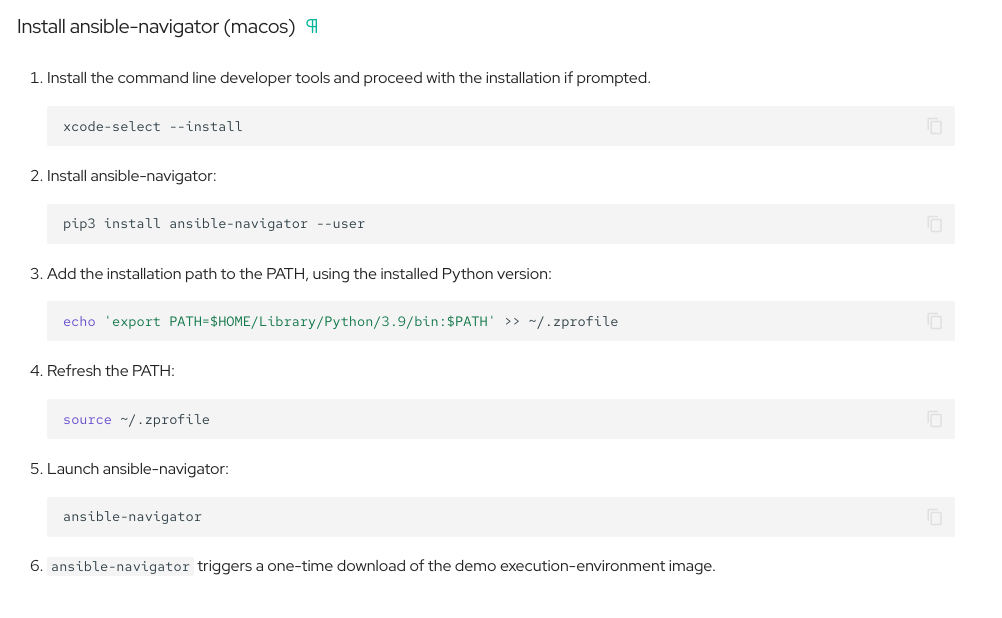
<p>Next, we’re going to now install <code class="language-plaintext highlighter-rouge">ansible-navigator</code> and you can find the documented <a href="https://ansible.readthedocs.io/projects/navigator/installation/#install-ansible-navigator-macos">instructions here.</a></p>

<p>I’ll include a screenshot here just for posterity to have a record of the current instructions at the time of writing this blog.</p>

<figure>
<a href="/assets/images/ansible-navigator/installation-instructions.png"><img src="/assets/images/ansible-navigator/installation-instructions.png" /></a>
</figure>

<p>Ensure that you export the appropriate <code class="language-plaintext highlighter-rouge">ansible-navigator</code> installation path as reported in the output of the installation.</p>

<div class="language-plaintext highlighter-rouge"><div class="highlight"><pre class="highlight"><code>╰─ echo 'export PATH=/Users/bpanyar/Library/Python/3.12/bin:$PATH' &gt;&gt; ~/.zprofile

╰─ source ~/.zprofile
</code></pre></div></div>

<p>After that you should be able to launch ansible-navigator:</p>

<div class="language-plaintext highlighter-rouge"><div class="highlight"><pre class="highlight"><code>╰─ ansible-navigator 

  ---------------------------------------------------------------------
  Execution environment image and pull policy overview
  ---------------------------------------------------------------------
  Execution environment image name:     ghcr.io/ansible/creator-ee:v0.20.0
  Execution environment image tag:      v0.20.0
  Execution environment pull arguments: None
  Execution environment pull policy:    tag
  Execution environment pull needed:    True
  ---------------------------------------------------------------------
  Updating the execution environment
  ---------------------------------------------------------------------
  Running the command: docker pull ghcr.io/ansible/creator-ee:v0.20.0
  v0.20.0: Pulling from ansible/creator-ee
  1e08c7e6aff8: Pull complete 
  ad97261d044b: Pull complete 
  7b05cec1a1b5: Pull complete 
  eaac7334e7ab: Pull complete 
  df17b198186c: Pull complete 
  6a4437d12ad5: Pull complete 
  90e5f6bd07c8: Pull complete 
  65aa82c7a1f1: Pull complete 
  897151f83099: Pull complete 
  19f93933b64e: Pull complete 
  8038a525cde8: Pull complete 
  11c3d85c8b64: Pull complete 
  d29defd3b078: Pull complete 
  Digest: sha256:b496e72a7b581fc8f437fab84d2e7f59c8a4e4ae8191d4c2478dd151c871cf1c
  Status: Downloaded newer image for ghcr.io/ansible/creator-ee:v0.20.0
  ghcr.io/ansible/creator-ee:v0.20.0
</code></pre></div></div>

<div class="language-plaintext highlighter-rouge"><div class="highlight"><pre class="highlight"><code> 0│Welcome
 1│————————————————————————————————————————————————————————————————————————————————————————————————————————————————————————————————————
 2│
 3│Some things you can try from here:
 4│- :collections                                    Explore available collections
 5│- :config                                         Explore the current ansible configuration
 6│- :doc &lt;plugin&gt;                                   Review documentation for a module or plugin
 7│- :help                                           Show the main help page
 8│- :images                                         Explore execution environment images
 9│- :inventory -i &lt;inventory&gt;                       Explore an inventory
10│- :log                                            Review the application log
11│- :lint &lt;file or directory&gt;                       Lint Ansible/YAML files (experimental)
12│- :open                                           Open current page in the editor
13│- :replay                                         Explore a previous run using a playbook artifact
14│- :run &lt;playbook&gt; -i &lt;inventory&gt;                  Run a playbook in interactive mode
15│- :settings                                       Review the current ansible-navigator settings
16│- :quit                                           Quit the application
17│
18│happy automating,
19│
20│-winston
</code></pre></div></div>

<h2 id="inspecting-execution-environment-image-details">Inspecting Execution Environment Image details</h2>
<p>Going into the <code class="language-plaintext highlighter-rouge">:images</code> option you can see there is a default image called <code class="language-plaintext highlighter-rouge">creator-ee</code> which we’ll use to test running an initial playbook.</p>

<div class="language-plaintext highlighter-rouge"><div class="highlight"><pre class="highlight"><code>  Image                       Tag                 Execution environment                                   Created                           Size
0│creator-ee                  v0.20.0             True                                                    2 months ago                      843MB
1│qus                         latest              False                                                   7 months ago                      306MB
</code></pre></div></div>

<p>Inspecting the <code class="language-plaintext highlighter-rouge">creator-ee</code> image with option <code class="language-plaintext highlighter-rouge">0</code> lists a number of options of details that you can inspect about the image. By selecting option <code class="language-plaintext highlighter-rouge">1</code> you should see the following error:</p>

<div class="language-plaintext highlighter-rouge"><div class="highlight"><pre class="highlight"><code>  Warning
  ─────────────────────────────────────────────────────────────────────
  humph. Something went really wrong while introspecting the image.
  Details have been added to the log file
  [HINT] Please log an issue about this one, it shouldn't have happened
  ─────────────────────────────────────────────────────────────────────
                                                                    Ok 
</code></pre></div></div>

<p>There will be a <code class="language-plaintext highlighter-rouge">ansible-navigator.log</code> file generated in your working directory which should show something along the lines of:</p>

<div class="language-plaintext highlighter-rouge"><div class="highlight"><pre class="highlight"><code>2023-10-27T21:08:07.304631+00:00 ERROR 'ansible_navigator.actions.images._parse' Unable to extract introspection from stdout
2023-10-27T21:08:07.305286+00:00 ERROR 'ansible_navigator.actions.images._parse' Image introspection failed (parsed), the return value was: /usr/bin/python3: can't open file '/Users/bpanyar/.cache/ansible-navigator/image_introspect.py': [Errno 2] No such file or directory
</code></pre></div></div>

<p>Which tells us that the reported <code class="language-plaintext highlighter-rouge">~/.cache</code> directory is not accessible to the EE container. This is where we are going to go back to the <code class="language-plaintext highlighter-rouge">docker.yaml</code> file from earlier and update the mount section to incude this directory. We can either update the file we used previously at <code class="language-plaintext highlighter-rouge">~/lima_machines/docker.yaml</code> or update  <code class="language-plaintext highlighter-rouge">~/.lima/lima.yaml</code> directly. If you choose to update the previous <code class="language-plaintext highlighter-rouge">docker.yaml</code> file, you need to copy it to <code class="language-plaintext highlighter-rouge">~/.lima/lima.yaml</code>.</p>

<p>My <code class="language-plaintext highlighter-rouge">mounts:</code> section looks like this with the <code class="language-plaintext highlighter-rouge">~/.cache</code> directory added to the bottom:</p>

<div class="language-plaintext highlighter-rouge"><div class="highlight"><pre class="highlight"><code>mounts:
  - location: "~/src"
    writable: true
  - location: "~/tmp"
    writable: true
  # NOTE: Replace %TEMPDIR% with your actual temporary directory as provided by
  # the $TMPDIR environment variable.
  - location: "/var/folders/9p/5rymmxbs59d1svryg_7knth80000gn/T/"
    writable: true
  - location: "/tmp/lima"
    writable: true
  - location: "~/.config"
    writable: true
  - location: "~/.lima"
    writable: false
  - location: "~/.kube"
    writable: true
  - location: "~/.ssh"
    writable: false
  - location: "~/.gnupg"
    writable: false
  - location: "~/.cache"
    writable: false
</code></pre></div></div>

<p>Next, we need to restart the Docker VM with:</p>

<div class="language-plaintext highlighter-rouge"><div class="highlight"><pre class="highlight"><code>limactl stop docker &amp;&amp; limactl start docker
</code></pre></div></div>

<p>After restarting Docker and re-launching <code class="language-plaintext highlighter-rouge">ansible-navigator</code>, we can now inspect all the image details of the <code class="language-plaintext highlighter-rouge">creator-ee</code> image.</p>

<h2 id="running-a-playbook-with-the-sample-ee">Running a playbook with the sample EE.</h2>

<p>For this I created a simple ping playbook which just pings localhost.</p>

<p>inventory.yml</p>
<div class="language-plaintext highlighter-rouge"><div class="highlight"><pre class="highlight"><code>systems:
  hosts:
    localhost:
      ansible_host: localhost
      ansible_connection: local
</code></pre></div></div>

<p>ping.yml</p>
<div class="language-plaintext highlighter-rouge"><div class="highlight"><pre class="highlight"><code>---
- hosts: all
  gather_facts: false

  tasks:
    - name: run ping
      ansible.builtin.ping:
      register: result

    - debug:
        var: result
</code></pre></div></div>

<p>To run the playbook with the default EE, I’ll change to the directory where this playbook is located and run the following command:</p>

<div class="language-plaintext highlighter-rouge"><div class="highlight"><pre class="highlight"><code>ansible-navigator run ping.yml -i inventory.yml
</code></pre></div></div>
<p>Note, by default <code class="language-plaintext highlighter-rouge">ansible-navigator</code> is configured to use the <code class="language-plaintext highlighter-rouge">creator-ee</code>. When creating your own execution environments you can use the <code class="language-plaintext highlighter-rouge">--eei</code> argument to specify the name of the execution environment image to use.</p>

<p>Immediately, you should see that the playbook runs without completing any tasks</p>

<div class="language-plaintext highlighter-rouge"><div class="highlight"><pre class="highlight"><code>  Warning
  ────────────────────────────────────────────────────────────────────────────
  The playbook completed without tasks. Redirecting to ':stdout' for review.
  ────────────────────────────────────────────────────────────────────────────
                                                                         Ok 
</code></pre></div></div>

<p>And by pressing enter you should see something like:</p>

<div class="language-plaintext highlighter-rouge"><div class="highlight"><pre class="highlight"><code>0│ERROR! the playbook: /Users/bpanyar/Downloads/navigator-test/ping.yml could not be found
</code></pre></div></div>

<p>Again, this is due to the EE container not being able to access the working directory where our playbook is located, so we’ll need to go back and update the <code class="language-plaintext highlighter-rouge">mounts:</code> section in the <code class="language-plaintext highlighter-rouge">~/.lima/lima.yaml</code> file and restart Docker again.</p>

<div class="language-plaintext highlighter-rouge"><div class="highlight"><pre class="highlight"><code>- location: "~/Downloads/navigator-test"
    writable: false
</code></pre></div></div>
<p>after doing that and re-running <code class="language-plaintext highlighter-rouge">ansible-navigator run ping.yml -i inventory.yml</code> you should see it execute successfully and be able to see that it completed 2 tasks and drill down into the play for more details.</p>

<div class="language-plaintext highlighter-rouge"><div class="highlight"><pre class="highlight"><code>  Play name        Ok   Changed       Unreachable          Failed      Skipped       Ignored       In progress          Task count                 Progress
0│all               2         0                 0               0            0             0                 0                   2                 Complete
</code></pre></div></div>
<p>Option 0</p>

<div class="language-plaintext highlighter-rouge"><div class="highlight"><pre class="highlight"><code>  Result         Host                  Number         Changed          Task               Task action                                   Duration
0│Ok             localhost                  0         False            run ping           ansible.builtin.ping                                0s
1│Ok             localhost                  1         False            debug              debug                                               0s
</code></pre></div></div>
<p>You can see the results of each task by entering its associated option number.</p>

<div class="language-plaintext highlighter-rouge"><div class="highlight"><pre class="highlight"><code>Play name: all:0
Task name: run ping
Ok: localhost                                                                                                                                               
 0│---
 1│duration: 0.18527
 2│end: '2023-12-01T21:49:57.495027'
 3│event_loop: null
 4│host: localhost
 5│play: all
 6│play_pattern: all
 7│playbook: /Users/bpanyar/Downloads/navigator-test/ping.yml
 8│remote_addr: localhost
 9│res:
10│  _ansible_no_log: null
11│  ansible_facts:
12│    discovered_interpreter_python: /usr/bin/python3
13│  changed: false
14│  invocation:
15│    module_args:
16│      data: pong
17│  ping: pong
18│resolved_action: ansible.builtin.ping
19│start: '2023-12-01T21:49:57.309757'
20│task: run ping
21│task_action: ansible.builtin.ping
22│task_args: ''
23│task_path: /Users/bpanyar/Downloads/navigator-test/ping.yml:6
</code></pre></div></div>

<p>Also notice that there is a json file generated in the working directory for every run of playbook. This is a playbook artifact that contains details about the <code class="language-plaintext highlighter-rouge">ansible-navigator</code> settings along with the play output. This can be inspected manually, or replayed in <code class="language-plaintext highlighter-rouge">ansible-navigator</code> using the <code class="language-plaintext highlighter-rouge">replay</code> argument. This is especially helpful for sharing your playbook output with other or debugging someone elses play when you can’t recreate it in your own environment.</p>

<p>Note, there seems to be a bug with <code class="language-plaintext highlighter-rouge">ansible-navigator</code> and you may need to rename your playbook artifact to be able to replay it. The artifact is created with <code class="language-plaintext highlighter-rouge">/</code> in the file name and the replay option interprets them as child directories thus is not able to find the artifact.</p>

<div class="language-plaintext highlighter-rouge"><div class="highlight"><pre class="highlight"><code>╰─ ansible-navigator replay ping-artifact-2023-12-01T21/49/57.821234+00/00.json  
Warning: Issues were found while applying the settings.
   Hint: Command provided: 'replay ping-artifact-2023-12-01T21/49/57.821234+00/00.json'

  Error: The specified playbook artifact could not be found:
         /Users/bpanyar/Downloads/navigator-test/ping-artifact-2023-12-01T21/49/57.821234+00/00.json
   Hint: Try again with 'replay &lt;valid path to playbook artifact&gt;'

   Note: Configuration failed, using default log file location. (/Users/bpanyar/Downloads/navigator-test/ansible-navigator.log) Log
         level set to debug
   Hint: Review the hints and log file to see what went wrong.
</code></pre></div></div>

<h2 id="conclusion">Conclusion</h2>
<p>In summary, its definitely possible to use <code class="language-plaintext highlighter-rouge">ansible-navigator</code> without Docker Desktop, with a small amount of effort and some minor technicalities to be aware of. While its not an officially supported installation path, it seems to do the job for building and executing Ansible Execution Environments for development purposes. In this blog I only covered using the default Execution Environment included with Ansible Navigator, but in a future blog I’ll cover creating your own Execution Environments using <code class="language-plaintext highlighter-rouge">ansible-builder</code>.</p>

<h3 id="tips">Tips</h3>
<ul>
  <li>Directories will need to be explicitely mounted for <code class="language-plaintext highlighter-rouge">ansible-navigator</code> and the EEs to accesss, so you may choose to mount a parent directory that holds all of your Ansible playbooks.</li>
</ul>

<p>Many thanks to Carlos Nunez for the simple to follow instructions for installing Lima with Docker.</p>]]></content><author><name>Bryant Panyarachun</name></author><category term="Blog" /><category term="Ansible" /><category term="Red Hat" /><category term="Automation" /><category term="installation" /><category term="Ansible Navigator" /><category term="Ansible Execution Environments" /><category term="Ansible Automation Platform" /><summary type="html"><![CDATA[“Ansible Navigator is a command-line tool and a text-based user interface (TUI) for creating, reviewing, running and troubleshooting Ansible content, including inventories, playbooks, collections, documentation and container images (execution environments).”]]></summary></entry><entry><title type="html">IBM Redbook - Accelerate Mainframe Application Modernization with Hybrid Cloud</title><link href="https://bryantp.dev/blog/app-modernization-redbook/" rel="alternate" type="text/html" title="IBM Redbook - Accelerate Mainframe Application Modernization with Hybrid Cloud" /><published>2023-04-04T00:00:00+00:00</published><updated>2023-04-04T00:00:00+00:00</updated><id>https://bryantp.dev/blog/app-modernization-redbook</id><content type="html" xml:base="https://bryantp.dev/blog/app-modernization-redbook/"><![CDATA[<p>Lots of effort went into this, not only by myself, but many other leaders in IBM to publish this Redbook intended to be a prescriptive guide on how to leverage many of our latest offerings as enterprises embrace the hybrid cloud. This Redbook covers several entrypoints for your mainframe application modernization journey supported with best practices and reference architectures for modernization.</p>

<p><a href="https://www.redbooks.ibm.com/abstracts/redp5705.html">IBM Redbooks - Accelerate Mainframe Application Modernization with Hybrid Cloud </a></p>

<p><a href="https://www.linkedin.com/posts/bryant-panyarachun-21510625_accelerate-mainframe-application-modernization-activity-7048724533201014785-xeeS?utm_source=share&amp;utm_medium=member_desktop">See my post on LinkedIn</a></p>]]></content><author><name>Bryant Panyarachun</name></author><category term="Blog" /><category term="link" /><category term="Ansible" /><category term="z/OS" /><category term="IBM Z" /><category term="Red Hat" /><category term="Automation" /><category term="mainframe" /><category term="hybrid cloud" /><category term="application modernization" /><category term="zSystems" /><category term="Redbook" /><category term="publication" /><summary type="html"><![CDATA[Lots of effort went into this, not only by myself, but many other leaders in IBM to publish this Redbook intended to be a prescriptive guide on how to leverage many of our latest offerings as enterprises embrace the hybrid cloud. This Redbook covers several entrypoints for your mainframe application modernization journey supported with best practices and reference architectures for modernization.]]></summary></entry><entry><title type="html">GitOps Guide to the Galaxy Episode 56: Ansible on zSystems with IBM</title><link href="https://bryantp.dev/blog/GitOps-Guide-to-the-Galaxy/" rel="alternate" type="text/html" title="GitOps Guide to the Galaxy Episode 56: Ansible on zSystems with IBM" /><published>2023-03-23T00:00:00+00:00</published><updated>2023-03-23T00:00:00+00:00</updated><id>https://bryantp.dev/blog/GitOps-Guide-to-the-Galaxy</id><content type="html" xml:base="https://bryantp.dev/blog/GitOps-Guide-to-the-Galaxy/"><![CDATA[<p>I had a great opportunity to talk about Ansible for zSystems on a live streamed Red Hat webcast called the GitOps Guide to the Galaxy alongside our Senior Go To Market Product Manager Dan Jast. It was such a fun time chatting with Red Hatters Hilliary Lipsig and Christian Hernandez about why the mainframe is still the platform of choice and backbone for mission critical workloads and what we’re doing to standardize the automation experience for the mainframe with Red Hat Ansible Automation Platform and Red Hat OpenShift. Check out the replay below on your streaming platform of choice and feel free to drop a comment with your thoughts about the mainframe or what we’re doing with Ansible.</p>

<table>
  <tbody>
    <tr>
      <td><a href="https://youtu.be/ZiIuu0spnp0" target="_blank">Youtube</a></td>
      <td><a href="https://www.twitch.tv/videos/1773480918" target="_blank">Twitch</a></td>
    </tr>
  </tbody>
</table>

<p>Follow Dan Jast on <a href="https://www.linkedin.com/in/daniel-jast-863598123/">LinkedIn</a><br />
Follow Hilliary Lipsig on <a href="https://www.linkedin.com/in/hilliary-lipsig-a5935245/">LinkedIn</a><br />
Follow Christian Hernandez on <a href="https://www.linkedin.com/in/chernandez1982/">LinkedIn</a></p>]]></content><author><name>Bryant Panyarachun</name></author><category term="Blog" /><category term="link" /><category term="Ansible" /><category term="z/OS" /><category term="IBM Z" /><category term="Red Hat" /><category term="Automation" /><category term="Podcast" /><category term="webcast" /><category term="gitops" /><category term="live stream" /><summary type="html"><![CDATA[I had a great opportunity to talk about Ansible for zSystems on a live streamed Red Hat webcast called the GitOps Guide to the Galaxy alongside our Senior Go To Market Product Manager Dan Jast. It was such a fun time chatting with Red Hatters Hilliary Lipsig and Christian Hernandez about why the mainframe is still the platform of choice and backbone for mission critical workloads and what we’re doing to standardize the automation experience for the mainframe with Red Hat Ansible Automation Platform and Red Hat OpenShift. Check out the replay below on your streaming platform of choice and feel free to drop a comment with your thoughts about the mainframe or what we’re doing with Ansible.]]></summary></entry><entry><title type="html">Automating IBM Z Mainframes with Ansible</title><link href="https://bryantp.dev/blog/Automating-Mainframes-with-Ansible/" rel="alternate" type="text/html" title="Automating IBM Z Mainframes with Ansible" /><published>2022-03-23T00:00:00+00:00</published><updated>2022-03-23T00:00:00+00:00</updated><id>https://bryantp.dev/blog/Automating-Mainframes-with-Ansible</id><content type="html" xml:base="https://bryantp.dev/blog/Automating-Mainframes-with-Ansible/"><![CDATA[<p>I had a chance to speak with Pete from the Level 99 Podcast on some of the exciting stuff we’re doing with Ansible and how customers are using it in their shops.</p>

<p><a href="https://anchor.fm/level99/episodes/Automating-IBM-Z-Mainframes-with-Ansible-e1g4516">Automating IBM Z Mainframes with Ansible</a></p>]]></content><author><name>Bryant Panyarachun</name></author><category term="Blog" /><category term="link" /><category term="Provisioning" /><category term="Ansible" /><category term="z/OS" /><category term="IBM Z" /><category term="Red Hat" /><category term="Automation" /><category term="Podcast" /><summary type="html"><![CDATA[I had a chance to speak with Pete from the Level 99 Podcast on some of the exciting stuff we’re doing with Ansible and how customers are using it in their shops.]]></summary></entry><entry><title type="html">The Future of Automated Provisioning on z/OS</title><link href="https://bryantp.dev/blog/provision-on-demand-part-3/" rel="alternate" type="text/html" title="The Future of Automated Provisioning on z/OS" /><published>2021-11-18T00:00:00+00:00</published><updated>2021-11-18T00:00:00+00:00</updated><id>https://bryantp.dev/blog/provision-on-demand-part-3</id><content type="html" xml:base="https://bryantp.dev/blog/provision-on-demand-part-3/"><![CDATA[<p>Part 3 of the provisioning series where we discuss the direction customers should be considering when automating middleware provisioning on z/OS.</p>

<p><a href="https://community.ibm.com/community/user/ibmz-and-linuxone/blogs/travis-biro1/2021/11/18/provision-on-demand-part-3">Provision On Demand Part 3: The Future of Automated Provisioning on z/OS</a></p>]]></content><author><name>Bryant Panyarachun</name></author><category term="Blog" /><category term="link" /><category term="Provisioning" /><category term="z/OSMF" /><category term="Ansible" /><category term="z/OS" /><category term="IBM Z" /><category term="Red Hat" /><category term="Automation" /><summary type="html"><![CDATA[Part 3 of the provisioning series where we discuss the direction customers should be considering when automating middleware provisioning on z/OS.]]></summary></entry><entry><title type="html">IBM and Red Hat Ansible</title><link href="https://bryantp.dev/blog/provision-on-demand-part-2/" rel="alternate" type="text/html" title="IBM and Red Hat Ansible" /><published>2021-10-22T00:00:00+00:00</published><updated>2021-10-22T00:00:00+00:00</updated><id>https://bryantp.dev/blog/provision-on-demand-part-2</id><content type="html" xml:base="https://bryantp.dev/blog/provision-on-demand-part-2/"><![CDATA[<p>Part 2 of the provisioning series where we dive a little bit deeper into provisioning solutions provided by IBM and Red Hat.</p>

<p><a href="https://community.ibm.com/community/user/ibmz-and-linuxone/blogs/travis-biro1/2021/10/22/provision-on-demand-part-2">Provision On Demand Part 2: IBM and Red Hat Ansible</a></p>]]></content><author><name>Bryant Panyarachun</name></author><category term="Blog" /><category term="link" /><category term="Provisioning" /><category term="z/OSMF" /><category term="Ansible" /><category term="z/OS" /><category term="IBM Z" /><category term="Red Hat" /><category term="Automation" /><summary type="html"><![CDATA[Part 2 of the provisioning series where we dive a little bit deeper into provisioning solutions provided by IBM and Red Hat.]]></summary></entry><entry><title type="html">Provision On Demand: What is Provisioning?</title><link href="https://bryantp.dev/blog/provision-on-demand/" rel="alternate" type="text/html" title="Provision On Demand: What is Provisioning?" /><published>2021-10-07T00:00:00+00:00</published><updated>2021-10-07T00:00:00+00:00</updated><id>https://bryantp.dev/blog/provision-on-demand</id><content type="html" xml:base="https://bryantp.dev/blog/provision-on-demand/"><![CDATA[<p>The beginning of a 3 part series exploring different opportunities for automated provisioning in your deployment lifecycle and dive into some of the solutions IBM is bringing to market for its clients.</p>

<p><a href="https://community.ibm.com/community/user/ibmz-and-linuxone/blogs/travis-biro1/2021/10/07/provision-on-demand">Provision on Demand Part One: What is Provisioning?</a></p>]]></content><author><name>Bryant Panyarachun</name></author><category term="Blog" /><category term="link" /><category term="Provisioning" /><category term="z/OSMF" /><category term="Ansible" /><category term="z/OS" /><category term="IBM Z" /><category term="Red Hat" /><category term="Automation" /><summary type="html"><![CDATA[The beginning of a 3 part series exploring different opportunities for automated provisioning in your deployment lifecycle and dive into some of the solutions IBM is bringing to market for its clients.]]></summary></entry><entry><title type="html">Set up your Ansible control node for getting started with Ansible for IBM Z</title><link href="https://bryantp.dev/tutorial/video/setup-ansible-control-node/" rel="alternate" type="text/html" title="Set up your Ansible control node for getting started with Ansible for IBM Z" /><published>2021-07-29T00:00:00+00:00</published><updated>2021-07-29T00:00:00+00:00</updated><id>https://bryantp.dev/tutorial/video/setup-ansible-control-node</id><content type="html" xml:base="https://bryantp.dev/tutorial/video/setup-ansible-control-node/"><![CDATA[<p>This video demonstrates how to set up your Red Hat Ansible control node for getting started automating processes for IBM Z with Ansible.</p>

<p><a href="https://ibm.biz/Bdfnix">Set up your Ansible control node for getting started with Ansible for IBM Z</a></p>]]></content><author><name>Bryant Panyarachun</name></author><category term="Tutorial" /><category term="Video" /><category term="link" /><category term="Ansible" /><category term="z/OS" /><category term="IBM Z" /><category term="Red Hat" /><category term="Automation" /><category term="installation" /><category term="python" /><summary type="html"><![CDATA[This video demonstrates how to set up your Red Hat Ansible control node for getting started automating processes for IBM Z with Ansible.]]></summary></entry><entry><title type="html">z/OS Academy - Ansible</title><link href="https://bryantp.dev/video/zOS-Academy-Ansible/" rel="alternate" type="text/html" title="z/OS Academy - Ansible" /><published>2021-07-29T00:00:00+00:00</published><updated>2021-07-29T00:00:00+00:00</updated><id>https://bryantp.dev/video/zOS-Academy-Ansible</id><content type="html" xml:base="https://bryantp.dev/video/zOS-Academy-Ansible/"><![CDATA[<p>Watch this session for an overview of the content available in the community today, see some demos of the automation in action, and how you can get started automating with Ansible for IBM Z.</p>

<p><a href="https://mediacenter.ibm.com/media/zOS%20Academy%20-%20Ansible/1_tpeq808d">z/OS Academy - Ansible</a></p>]]></content><author><name>Bryant Panyarachun</name></author><category term="Video" /><category term="link" /><category term="Ansible" /><category term="z/OS" /><category term="IBM Z" /><category term="Red Hat" /><category term="Automation" /><category term="installation" /><category term="python" /><category term="New to Z" /><summary type="html"><![CDATA[Watch this session for an overview of the content available in the community today, see some demos of the automation in action, and how you can get started automating with Ansible for IBM Z.]]></summary></entry><entry><title type="html">Ansible &amp;amp; UCD Better Together for IBM Z</title><link href="https://bryantp.dev/video/Ansible_and_UCD/" rel="alternate" type="text/html" title="Ansible &amp;amp; UCD Better Together for IBM Z" /><published>2020-12-01T00:00:00+00:00</published><updated>2020-12-01T00:00:00+00:00</updated><id>https://bryantp.dev/video/Ansible_and_UCD</id><content type="html" xml:base="https://bryantp.dev/video/Ansible_and_UCD/"><![CDATA[<p>In this video we cover some of the benefits of using Ansible and UCD to manage your application deployments on IBM Z.</p>

<p><a href="https://mediacenter.ibm.com/media/Ansible%20%26%20UCD%3A%20Better%20Together%20for%20IBM%20Z/1_riw1rg2x">Ansible &amp; UCD Better Together for IBM Z</a></p>]]></content><author><name>Bryant Panyarachun</name></author><category term="Video" /><category term="link" /><category term="Ansible" /><category term="z/OS" /><category term="IBM Z" /><category term="Red Hat" /><category term="Automation" /><category term="UCD" /><category term="Urban Code Deploy" /><category term="Application deployment" /><summary type="html"><![CDATA[In this video we cover some of the benefits of using Ansible and UCD to manage your application deployments on IBM Z.]]></summary></entry></feed>